Instrumentation, simplified.
From P&ID to loop diagram. Start from the P&IDs and the process data. INSTloop produces the instrument deliverables, checks the engineering, and keeps every document in step when the process changes.
- P&IDs + process data →
- Instrument list →
- Datasheets & calcs →
- I/O list →
- Hook-ups →
- Cables & JBs →
- Loop diagrams
One source of truth for every tag, from the first P&ID to the last loop diagram.
Instrument work is mostly copying. It shouldn't be.
The same pressure, temperature and flow are typed into the index, the datasheet, the calculation and the I/O list, and then typed again at every process revision.
The usual way
- Process data copied by hand into each datasheet
- A revised line list means hunting for every sheet it touches
- Sizing in one spreadsheet, the datasheet in another, the I/O list in a third
- Checks depend on who reviews, and when
With INSTloop
- Process data entered once, used everywhere
- Every deliverable produced from the same data
- Revisions reach every document they affect
- Engineering checks built in, not left to chance
The instrument deliverables, from one set of data.
Each is reviewed, signed off and issued with its revision, as PDF, Excel or your client's own forms.
Instrument list
Built from the instruments on your P&IDs, each tag carrying the process data of its line or vessel.
- Process and control-system views
- Tags found on the P&IDs for you to approve
- Issued with revisions

Datasheets
A datasheet for every instrument, valve and analyser, in IEC 61987 style or filled into your client's own Excel form.
- Values from the process data in black; calculated or assumed in blue
- Ex marking from the area classification
- Review and sign-off before issue

Calculation sheets
Every calculation names its method and shows its inputs and result, ready for a checker.
- Control valves: Cv, opening, choked flow, cavitation, noise
- DP flow elements, relief valves, thermowells
- A failing thermowell comes with a proposed fix

I/O list
Made from the datasheets: every signal with its type, power and destination system.
- Isolators and barriers for intrinsically safe loops
- SIL points routed to the safety system
- Spares by your own rule

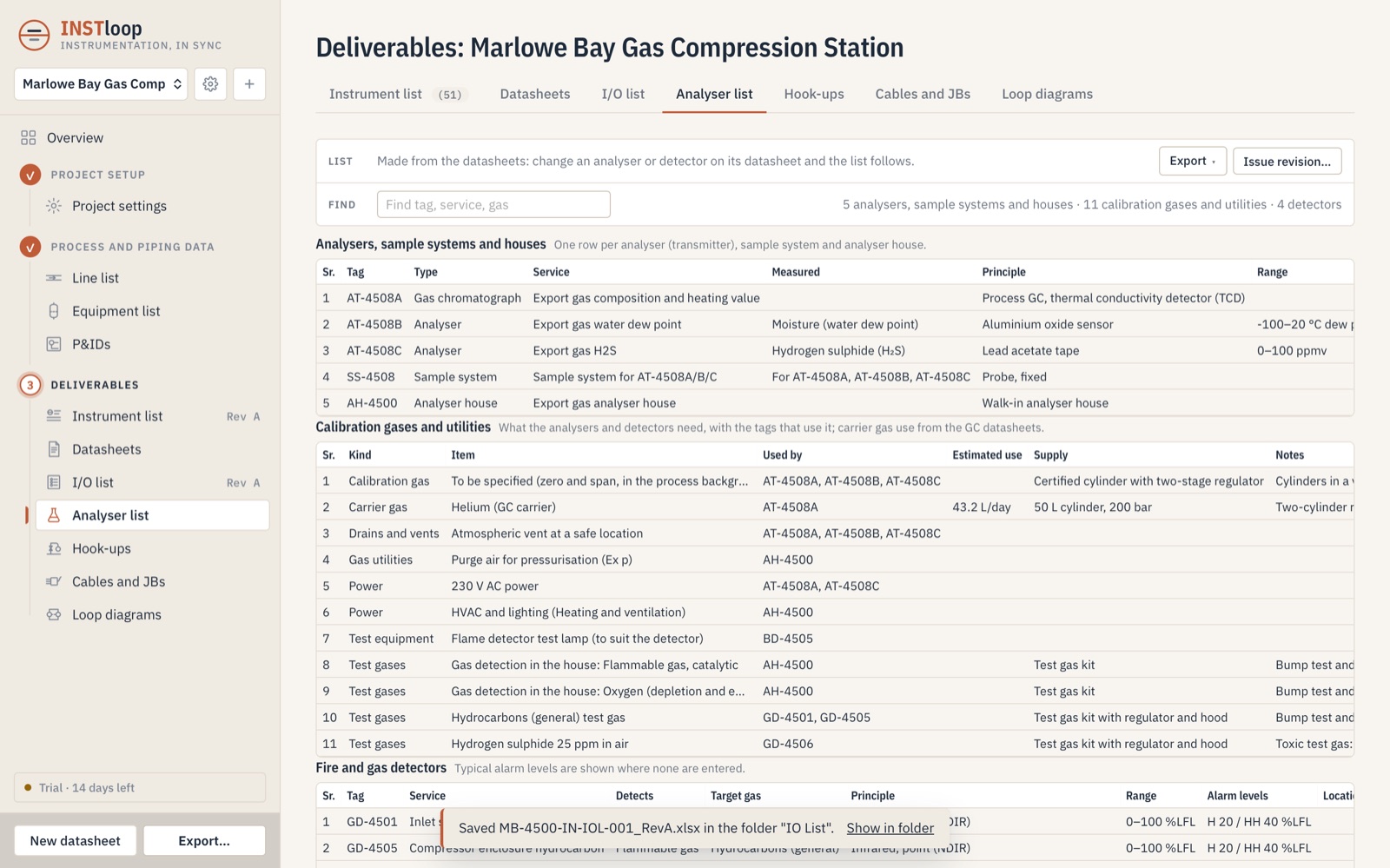
Analyser list
Process analysers, gas and flame detection, and emissions monitoring in one list.
- Sample systems and analyser houses
- Calibration and carrier gases
- Utilities for each analyser
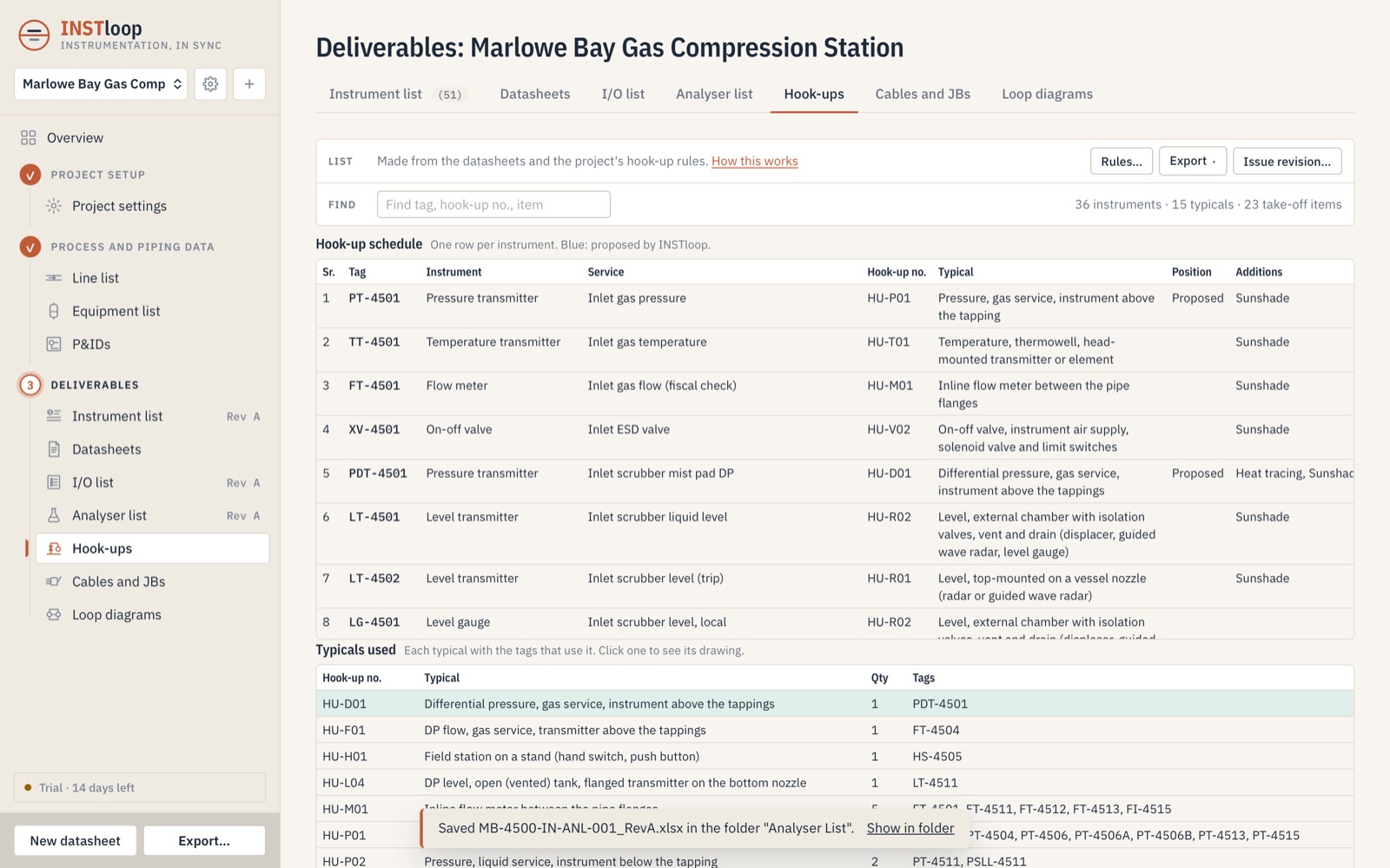
Hook-ups
An installation typical for each instrument, with its bill of materials.
- A3 hook-up drawings
- Project material take-off
- Your own project rules
Cables and junction boxes
Branch cables, junction boxes and multicores from the I/O list and the rules you set.
- Spares and signal segregation
- Cable totals per specification
- Cable lengths entered by you, never guessed

Loop diagrams
A loop diagram for each wired loop, from device to system I/O.
- Device, cables, junction box, marshalling, system
- 2-, 3- and 4-wire connections
- Issued with the rest of the set

Checks an engineer would make.
INSTloop flags what needs a second look. It proposes; it never silently changes. Fluid properties stay the process engineer's.
- Choked flow, cavitation and noise on control valves
- Thermowell wake frequency and stress
- Relief valve area and orifice selection
- Ranges, set points and direct-mount temperature limits
- Wetted materials against the fluid, including sour service
- Piping class and nozzle ratings against design conditions
- Ex marking from the area classification
- Tight shut-off and fire-safe requirements for on-off and shutdown valves
- A change in the process data marks every document it affects for review
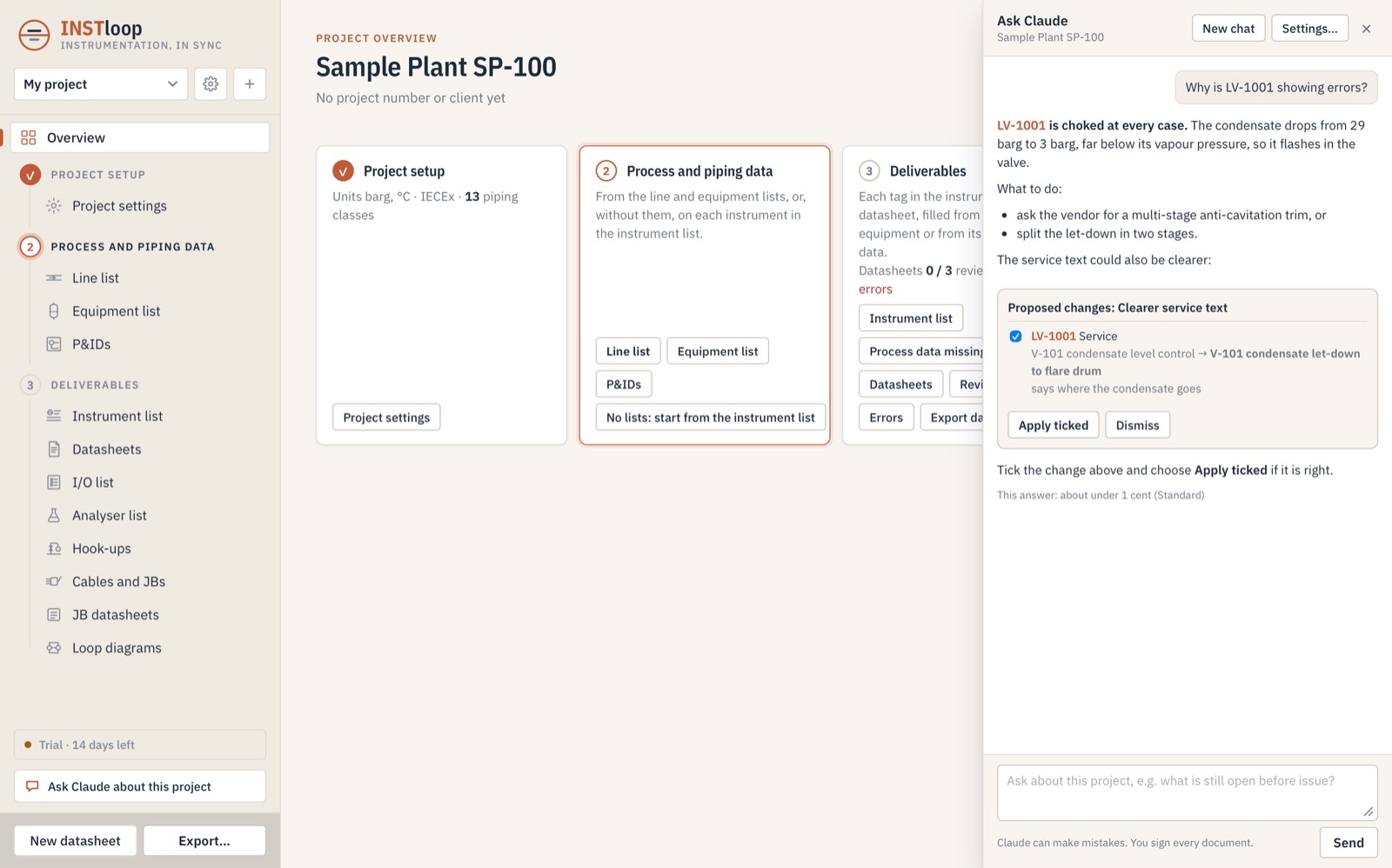
Ask your project why.
INSTloop's checks find the problem. Claude explains it. Ask, in plain words, why a datasheet shows an error, what is still open before issue, or what changed after a list revision. Claude reads your datasheets, checks and lists and answers in seconds. Instrument tags in the answer open the datasheet.
When Claude suggests a change, you see the current value, the new value and the reason. Tick what you agree with; nothing changes until you do. You still review and sign every document.
- Off until the project lead turns it on
- Your own Anthropic API key, kept on your computer
- Nothing sent unless you ask a question
Methods a checker can follow.
The standard behind each result is named on the calculation sheet, with the inputs it used.
Control valve sizing
Liquid and gas flow coefficients, valve opening, choked flow and cavitation.
Control valve noise
Predicted aerodynamic and hydrodynamic noise, with a low-noise trim proposed when high.
DP flow elements
Orifice plates, venturis and nozzles: bore, differential pressure and pressure loss.
Relief valve sizing
Required relieving area for the relief case.
Relief valve orifice
Standard orifice letter and valve size selected from the required area.
Thermowells
Wake frequency, in-line resonance and stress, with a shorter or stronger well proposed on failure.
Datasheet structure
Datasheet layout and property naming for process instruments.
Hazardous areas
Ex marking, gas group and temperature class from the area classification.
Pressure gauges
Gauge sizes, ranges and accuracy classes.
Valve shut-off
Tight shut-off and the leakage test for on-off and shutdown valves.
Fire-safe valves
Fire-tested design required for valves in flammable service.
Machinery protection
Vibration, position and speed points on machines, with I/O to the protection system.
Everything in the box.
One application for the instrument scope of a project, from setup to issue.
Project setup
- Project units, set once
- Piping classes and ratings
- Hazardous-area schemes
- Tag style and project rules
- Hook-up, junction box and cable rules
Process and piping data
- Line list and equipment list
- P&IDs, with tags found for you to approve
- Process data for every tag from its line or vessel
- Source of each value recorded
Specification
- Transmitters, switches and gauges
- Flow meters and DP flow elements
- Level, temperature and thermowells
- Control, on-off and relief valves
- Analysers, gas and flame detectors
- Vibration and machine monitoring
Control system and wiring
- I/O list with isolators and barriers
- SIL routing and spares
- Junction boxes, branch cables, multicores
- Loop diagrams for every wired loop
Review and issue
- Review and sign-off per document
- Revisions on every deliverable
- Changes marked for review
- PDF, Excel and client forms
On your computer
- Mac and Windows
- Works offline
- Nothing uploaded (optional AI chat sends only what you ask about)
- Exports to the folders you choose
Your client's data stays on your computer.
INSTloop runs offline on Mac and Windows. Nothing is uploaded, unless you turn on the optional AI chat for a project: then a question, and the project data needed to answer it, go to Anthropic with your own key. Exports go only to the folders you choose.
Frequently asked.
Who is INSTloop for?
Instrumentation engineers in engineering companies, contractors and owner teams who prepare the instrument deliverables for process plants.
Do I need an internet connection?
No. INSTloop runs on your Mac or Windows computer and works offline. Your project files stay on your computer. Only the optional AI chat needs a connection, when you ask it a question.
Can I use my client's datasheet forms?
Yes. Datasheets can be filled into your client's own Excel forms, or issued in INSTloop's IEC 61987-style layout.
Does INSTloop replace the engineer's review?
No. INSTloop is a design aid. It flags what needs a second look and proposes fixes, but every document is reviewed and signed off by a responsible engineer before it is issued.
What happens when the process data changes?
Each instrument takes its data from its line or vessel, so a change reaches every document that uses it, and those documents are marked for review.
How do I try it?
Write to product@instloop.com for a 14-day trial and a price. We'll send the installer for Mac or Windows.
Try it on your next project.
Write to us for a 14-day trial and a price. Tell us a little about your work and we'll send the installer for Mac or Windows.